Beard Photo Stickers: Align the Style with the Face
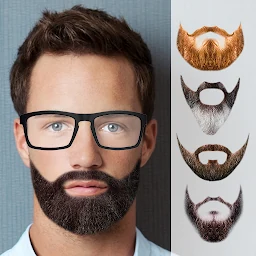
A practical Beard workflow: start with a front-facing portrait, compare one beard style at a time, adjust scale and rotation, then inspect the cheek and chin alignment.
Start with a clear face angle
Choose a photo where the lower face is not covered by a hand, collar or heavy shadow. A front-facing or slightly turned portrait makes both sides easier to inspect during the first comparison.
Compare one style at a time
The current Google Play listing names beard, moustache, hairstyle and glasses stickers. Begin with the beard layer alone so length and width can be judged without competing elements.
Fit the cheeks and chin first
The official description lists sticker scaling and rotation. Align the upper edge with the cheek line first, then check that the lower part does not extend too far beyond the chin.
Rotate with the head angle
If the head is slightly tilted, rotate the sticker by a small amount. Return to the full portrait after every adjustment: zoom helps with an edge, but it does not show overall balance.
Save two versions for a fair comparison
Create two versions with different beard shapes while keeping the crop unchanged. A side-by-side comparison is more useful than cycling through many stickers on one screen.
Games and apps in this article
Beard
Beauty & style · 1M+
Google Play ↗