How to blend two photos: double-exposure ideas
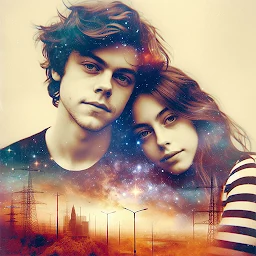
A portrait and a landscape, a silhouette and city lights: choose two pictures and create a balanced composition with Blend Photo on Android.
Choose your main photo
Start with the picture you want people to notice first. A portrait against a simple background is a useful first experiment: the face and outline give the composition a clear focus. Two very detailed pictures can compete for attention. Use your own photographs or images you have permission to use.
Find a second picture that sets the mood
Sea and clouds can create a softer look, branches and leaves suggest a nature theme, and city lights suit an evening composition. Try two or three images with different amounts of detail. The arrangement of broad light and dark areas matters more than matching the subjects of both photos.
Combine your pictures in Blend Photo
Open Photo Blender and select two pictures. The app includes photo blending, opacity adjustment, blending modes and filters. Adjust opacity a little at a time and compare the result. Let the second picture support the main one while keeping important details recognizable. Control names and positions may vary between app versions.
Try three combinations
Experiment with a portrait and clouds, a silhouette and a forest, or a city scene and lights. Start with a moderate blend for each pair. If eyes, facial outlines or the main subject disappear, reduce the second image’s opacity or choose a less detailed picture. There is no single best opacity percentage: the lighting and contrast of your original photos determine the balance.
Save and compare your result
Before saving, look at both the full composition and its small details. Check for bright lines crossing a face or important shapes merging together. Save the version you like and keep your original pictures separately so you can try another combination later.
How is blending different from a collage?
A collage usually places photos in separate areas. Blending overlays the pictures to create a shared composition. A double-exposure effect is particularly effective when the second image adds atmosphere and the main subject stays recognizable.
Featured in this story
Photo Blender - Combine Photos
Photo effects · 100K+
Explore