Piercing Stickers on Photos: Match Size and Position
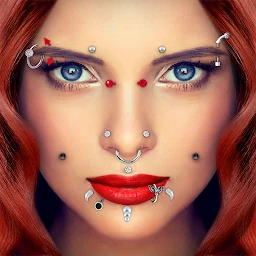
A practical Piercing Filter Camera workflow: choose a suitable photo, try one piercing style, adjust size and position precisely, then save a small comparison set.
Prepare a photo with a clear angle
Choose a photo where the target area—nose, ear, lip or another body area—is visible and not covered by hair. The official Google Play workflow starts by selecting a photo.
Compare one piercing type at a time
The current listing names nose, ear, lip, navel and other piercing stickers. Pick one area first and compare two related designs before applying a filter.
Fit the size and position
Google Play explicitly says the sticker can be placed on the photo and adjusted for size and position. Zoom into the target area and align the jewelry with the skin contour while keeping a natural angle.
Review the full frame
Zoom back out after precise placement. Check that the sticker is not oversized or shifted away from the intended point; only then test a photo effect.
Save a small comparison set
The official description supports saving and sharing the edited photo. Keep the source and two versions with matching crops so the design difference remains easy to judge.
Games and apps in this article
Piercing Filter Camera
Beauty & style · 100K+
Google Play ↗