Portrait and landscape blends: 3 composition ideas
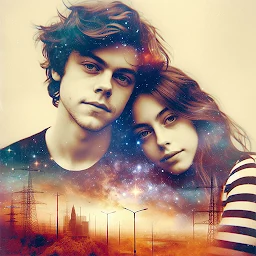
Blend a portrait with the sea, mountains or dunes in Blend Photo. Explore three double-exposure ideas and arrange details while keeping the face recognizable.
Decide what the landscape should contribute
Before blending a portrait and a landscape, choose the main point of interest. If facial expression matters most, look for a second photo with broad, quiet areas such as sky, smooth water or sand. If you want to convey a sense of place, try a more prominent landscape while keeping the profile and head outline recognizable. Describe the idea in one phrase: a peaceful seaside portrait, or a gaze towards the mountains. This helps you choose pictures for their role in the composition, rather than simply because each looks attractive on its own.
Prepare the pairs before blending
Choose one portrait and three landscape photos you have permission to use. Notice the brightest patches and strongest lines in each frame. Imagine where they might cross the eyes, nose and mouth when combined. Pictures with the same orientation are a convenient starting point for comparing the arrangement of large shapes. If a crop needs adjusting, prepare a copy in your gallery editor beforehand and keep the original. Do not assume that blending will automatically remove distracting details or confine the landscape to the outline of the face.
Idea 1. A portrait and a calm sea
For a gentle seaside look, try an evenly lit portrait and a sea photo without lots of boats, people or bright reflections. Check the horizon when choosing the picture: a line across the eyes or mouth may look like an accidental stripe. Select another sea photo or crop a copy beforehand. Try giving the face a quiet area of water or sky, with a more noticeable wave closer to the shoulders. If the face is meant to lead the composition, check whether the eyes are still the first feature you notice.
Idea 2. A profile and a mountain ridge
The direction of the gaze can guide this pairing. Choose a profile or three-quarter portrait and a landscape where a slope or chain of peaks leads visually in the same direction. This can suggest travel or anticipation of a journey. Compare a landscape with one large peak against another with many small peaks. The busier ridge may compete with the facial outline, so start with simpler terrain. Watch for a sharp mountain edge crossing the nose or chin in a way that changes the recognizable silhouette. If that happens, try a different source photo.
Idea 3. A close portrait and sand dunes
Dunes offer a way to experiment with flowing lines and a limited range of colors. Look for one or two broad curves rather than a dense pattern of footprints. Try a portrait showing the face, neck and part of the shoulders, and compare those shapes with the curves of the sand before blending. The lines do not need to match precisely. Instead, check whether a dark shadow on a dune becomes an unwanted patch across a cheek or beneath the eyes. Compare a lighter landscape with a more contrasting one while keeping the portrait unchanged.
Compare the compositions in Blend Photo
Blend Photo includes blending two photographs, opacity adjustment, blending modes and filters. Select a prepared pair for each idea and assess the broad shapes first. Then explore blending modes and adjust opacity gradually while watching the face and landscape edges. There is no single mode or percentage that suits all these pairings. Leave filters until you are happy with the arrangement of details. Control names and positions may differ between app versions; these composition suggestions do not depend on a particular button or named blending mode.
Choose one result from the three ideas
Save a version you like from each pair and compare them in your gallery, first as whole pictures and then at a larger size. In the smaller view, check the main focus: can you distinguish the face and intended landscape, or do you mainly see a busy texture? Look more closely at the eyes, nose outline and transitions across the neck. If a composition only appeals with a strong filter, reconsider the source photos. For the next attempt, change just one element, such as the sea picture, and keep everything else consistent so you can judge its effect.
Featured in this story
Photo Blender - Combine Photos
Photo effects · 100K+
Explore